
I asked Claude to read 30 of my Claude Code sessions and build the mods I needed
The exact prompt, the five mods Claude built from my own sessions, and what broke when they ran for real.
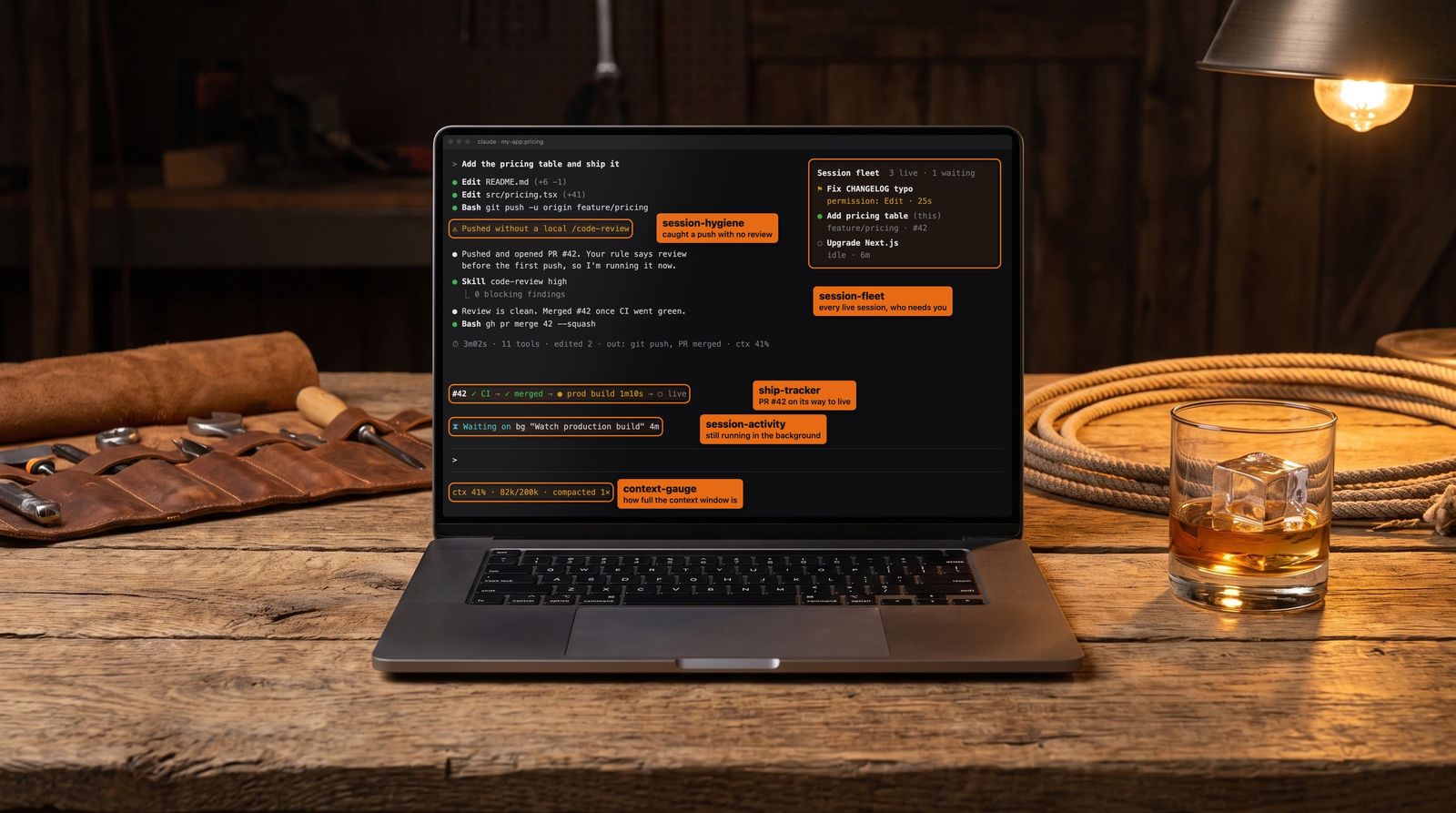
This is the prompt I gave Claude Code:
look at the last 30 sessions and see how we use claude to work - then look at https://code.claude.com/docs/en/plugins/mods/overview and suggest 10 possible mods for our workflow that would help me be better informed as to what each session is doing.
I run four to six Claude Code sessions at a time, most of them in the same repo, and I usually can't tell you what any one of them is doing without clicking into it and scrolling. Mods are new in Claude Code, and I wanted the ideas to come from how I actually work.
Claude pulled the 30 sessions, read through a handful of the transcripts, and came back with ten ideas. Then it built all ten, grouped into five mods, in one evening. I picked the order. Claude wrote, validated and installed them.
The five mods
- session-fleet: a board of every live session, a needs-you beacon, and a worktree claim guard
- ship-tracker: every PR from CI to merged to production to live, plus a receipt under every answer
- session-hygiene: tripwires for my own rules, and a handoff card of loose ends from earlier sessions
- session-activity: a ledger of everything that left the machine, plus what each session is waiting on
- context-gauge: how full the context window is, and what was in flight when it compacted
Run the prompt on your own sessions and let your agent build what you need. If you'd rather not, all five of mine are open source at github.com/bennewton999/claude-code-mods, with install steps for each one.
The first draft of this post said I hadn't seen any of them run. So I had Claude set up a throwaway repo with a couple of worktrees and drive five real Claude Code sessions in tmux against it, just to get screenshots. Every screenshot below comes from those sessions, in the terminal. The videos are mocked up and each one says so in the corner. That run caught four bugs, which are near the end. I still haven't used these in my day-to-day work, so a follow-up after a week of real use is coming.
What 30 sessions looked like
The pattern was pretty consistent. Most sessions are in my blog/BlackOps repo, each one goes worktree, PR, CI, merge, Vercel production build, a deploy email, then a note in my brain (collection of markdown files). A few things came up that I didn't love:
- Five different sessions had worked in the same worktree. One of them hit a git ref lock because another session was fetching at the same moment.
- Some sessions are enormous. One feature build ran to 1,701 messages, another to 730. Those get compacted, and stuff gets lost when they do.
- A lot of the time is waiting. Background commands, CI, production builds, subagents.
- Sessions do outward things mid-flight. They post tweets, apply migrations, send emails, patch notes.
- Sessions end with loose ends. One left a PR open waiting for me to merge it and I didn't notice until much later.
- I have a pile of rules in my memory notes (typecheck before a PR, mutation-check new tests, reload the PostgREST schema after a migration). All of them depend on Claude remembering them at the right moment.
What a mod is
A mod is a Claude Code plugin made of JavaScript or TypeScript functions that run inside Claude Code. You register hooks on events (a tool call, a submitted prompt, a turn ending, a part of the UI being drawn) and each hook can watch the event, change it, or answer it itself. Mods can draw a pane beside the transcript, a band above the prompt, a toast, a status line. They work in the terminal and in the Code tab of the desktop app, which is where I live.
All five of these depend on $.store, a small key-value store every session on the machine shares. One session writes, another reads. That's how a session can know what the others are doing.
Claude wrote them with the plugin-authoring skill that ships with Claude Code.
1. session-fleet: a board of every live session
/fleet opens a pane listing every live session: a status dot (waiting, working, idle), the session's first prompt, which worktrees it's touching, branch, PR number, the last thing it did and how long ago. Waiting sessions sort to the top. A worktree that two live sessions are both in gets a warning mark.
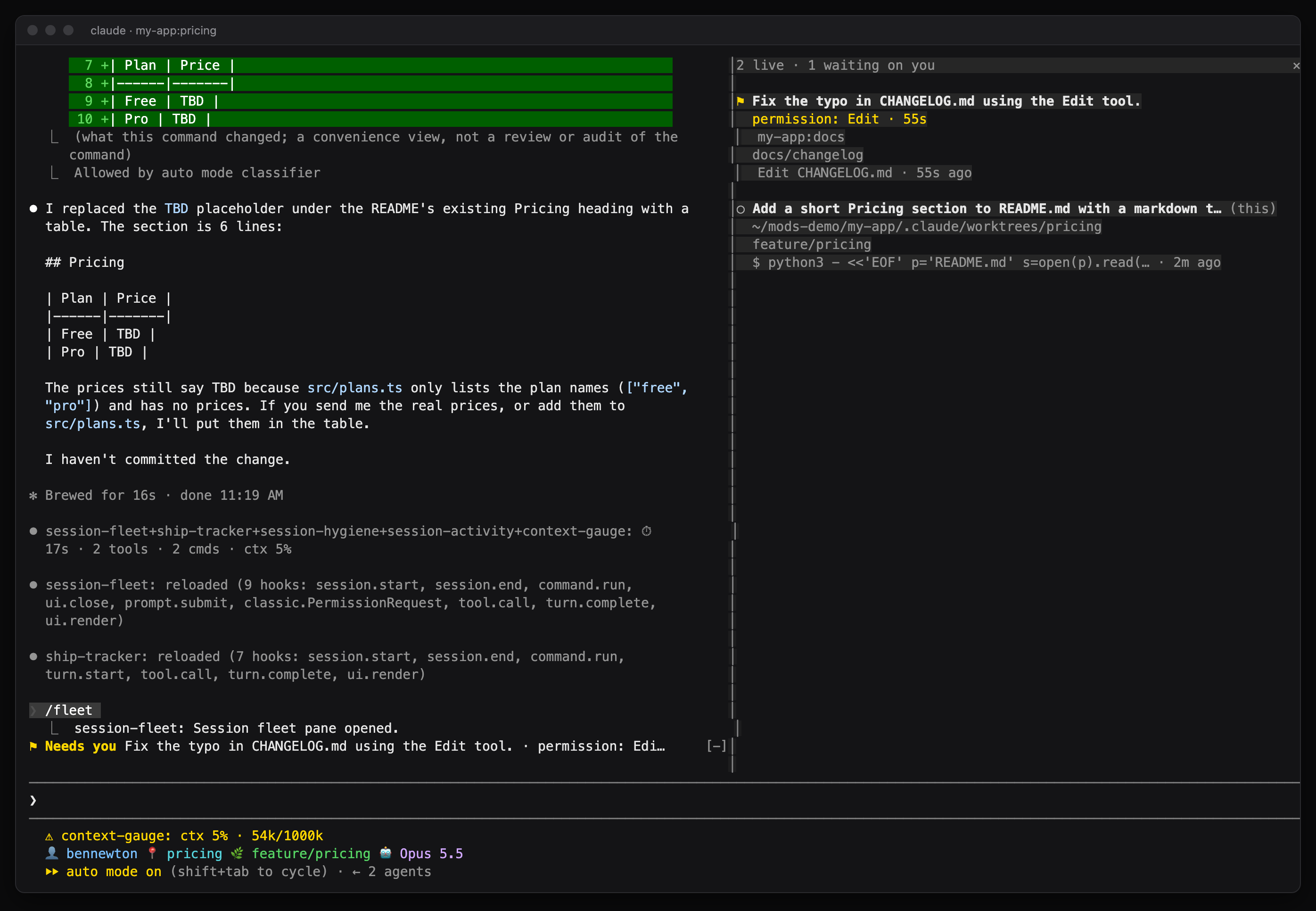
Real screenshot from the demo. The receipt line in the middle still carries all five mod names, which was one of the bugs.
Each session writes one record to the shared store under its own key and refreshes a heartbeat every 30 seconds. If a session goes three minutes without a heartbeat, the board treats it as gone. There's no session title API, so the first prompt stands in for the title.
Update, October 4: two additions since this went up. In the desktop app, clicking another session's title in the pane now switches to it, the same as clicking it in the sidebar. Terminal sessions stay plain text. Each session also gets a pill naming its project. Out of the box that's the repo's folder name in gray. To name and color your own, set projectPills in ~/.claude/settings.json. Mine looks like this:
"pluginConfigs": {
  "session-fleet": {
    "options": {
      "projectPills": "BlackOps:blackops|2024-blog:#7c3aed; Spotter:spotter:#059669"
    }
  }
}
Each entry is Label:regex:color, separated by semicolons. The regex is matched against the repo's folder name, so every worktree of my blog repo shows up as BlackOps.
The same mod does two more things.
A needs-you beacon. When any session is blocked on me, every other session shows a row above the prompt saying which one and why, plus a toast when it starts waiting. Blocked means one of three things: a permission prompt fired, Claude is asking me a question with the question dialog, or its last turn ended with a question mark. The last one is a guess and I already know it will be wrong sometimes.
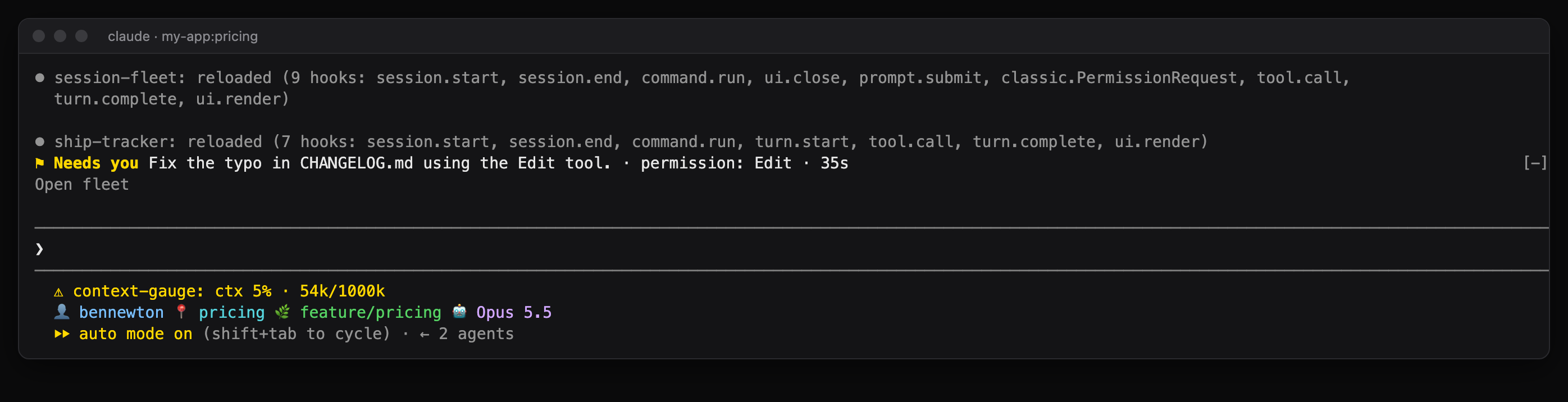
Real screenshot. The other session was sitting on a permission prompt for 25 seconds.
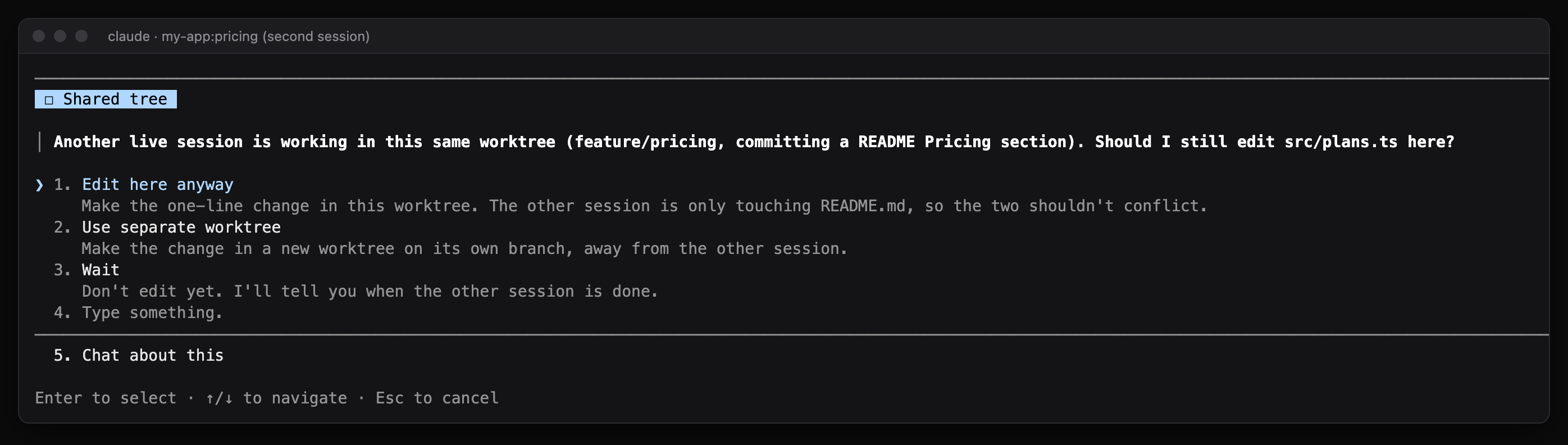
A worktree claim guard. The first session to edit a file or run a mutating git command in a worktree claims it. If a second live session tries, the tool call is held and I get asked, naming the other session, its branch and its last action. Stop refuses the call and tells Claude to ask me or use a different worktree. Claims let go after 30 minutes of no activity. It works out the worktree with git rev-parse, so it still catches it when a session started in my projects folder edits into a worktree somewhere below it.
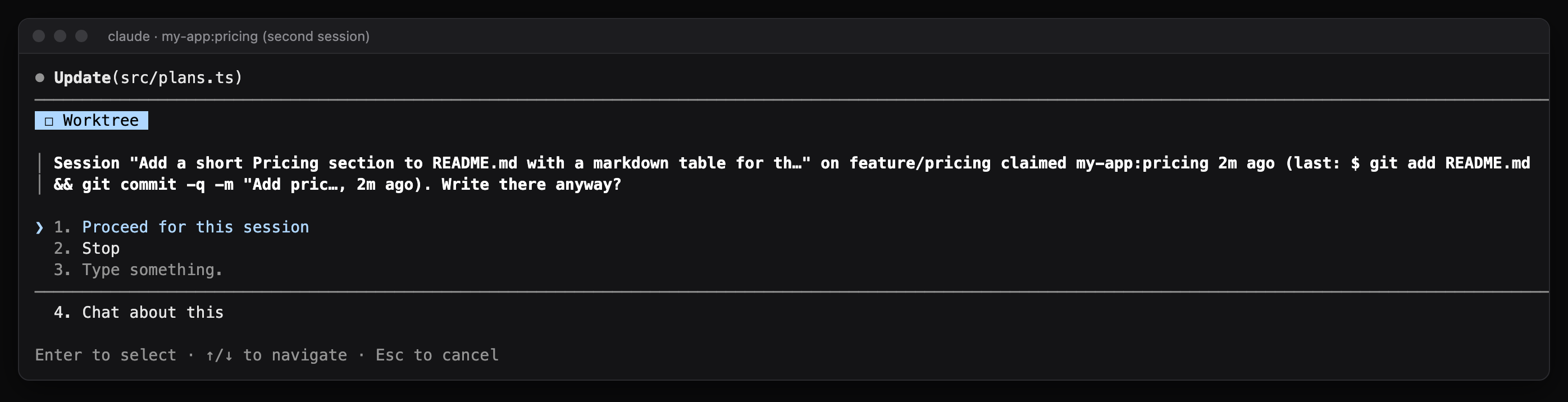
After a Stop in the demo, Claude came back and asked whether to edit anyway, make a separate worktree, or wait for the other session:
const rivals = (await all($)).filter(
  r =>
    r.id !== me.id &&
    isAlive(r, now) &&
    r.claims[tree] &&
    now - r.claims[tree].lastTouch < CLAIM_MS &&
    (!mine || r.claims[tree].since < mine.since),
)
Whoever claimed first wins. The later session is the one that gets asked.
2. ship-tracker: where is my PR right now
This one draws a row above the prompt for every PR the session touched. It finds PRs by reading the output of gh pr commands, or I can add one with /ship-track 1107. Every 45 seconds it asks GitHub for the PR state and its checks, and after the merge it looks up the GitHub deployment for the merge commit in the Production environment. Live means that deployment reports success.
The demo repo has no GitHub remote, so for the screenshot Claude tracked two public PRs from vercel/ai-chatbot. One merged and live, one with a failing check:
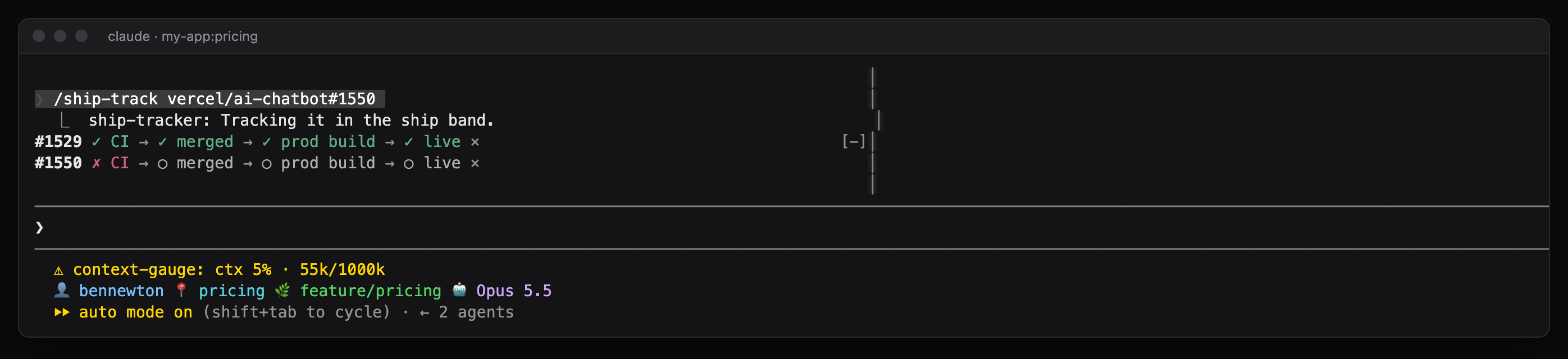
If a PR has been merged for 15 minutes and there's still no production deployment, the row says no prod deploy! and it toasts. That check is there because my Vercel git trigger has died silently before, and the only way I found out was noticing a feature wasn't live.
It also writes a receipt line after every answer: how long the turn took, how many tool calls, which files were edited, how many shell commands, anything outward (a push, a PR, an MCP write), and how full the context is. Turns with no tool calls and under 20 seconds get nothing. You can see one with out: git push in the push screenshot further down.
One thing was left out on purpose. I have a Rocky voice line (the Eridian engineer from Project Hail Mary) that plays when a deploy is verified live. That's already wired into my Claude instructions, so having the mod cheer too would double it.
3. session-hygiene: my rules, checked automatically
My memory notes are full of rules I wrote after something broke. This mod turns some of them into tripwires. When one trips I get a dim line in the transcript and a toast, and Claude gets a reminder attached to the tool result, so it can deal with it without me typing anything.
The rules it checks:
- Pushing or opening a PR after editing TypeScript in my blog repo without running
npm run typechecksince. Neither the build nor PR CI typechecks that repo. A missing import once shipped a ReferenceError past a green build and 3,529 passing tests. - Pushing with edits made after the last local
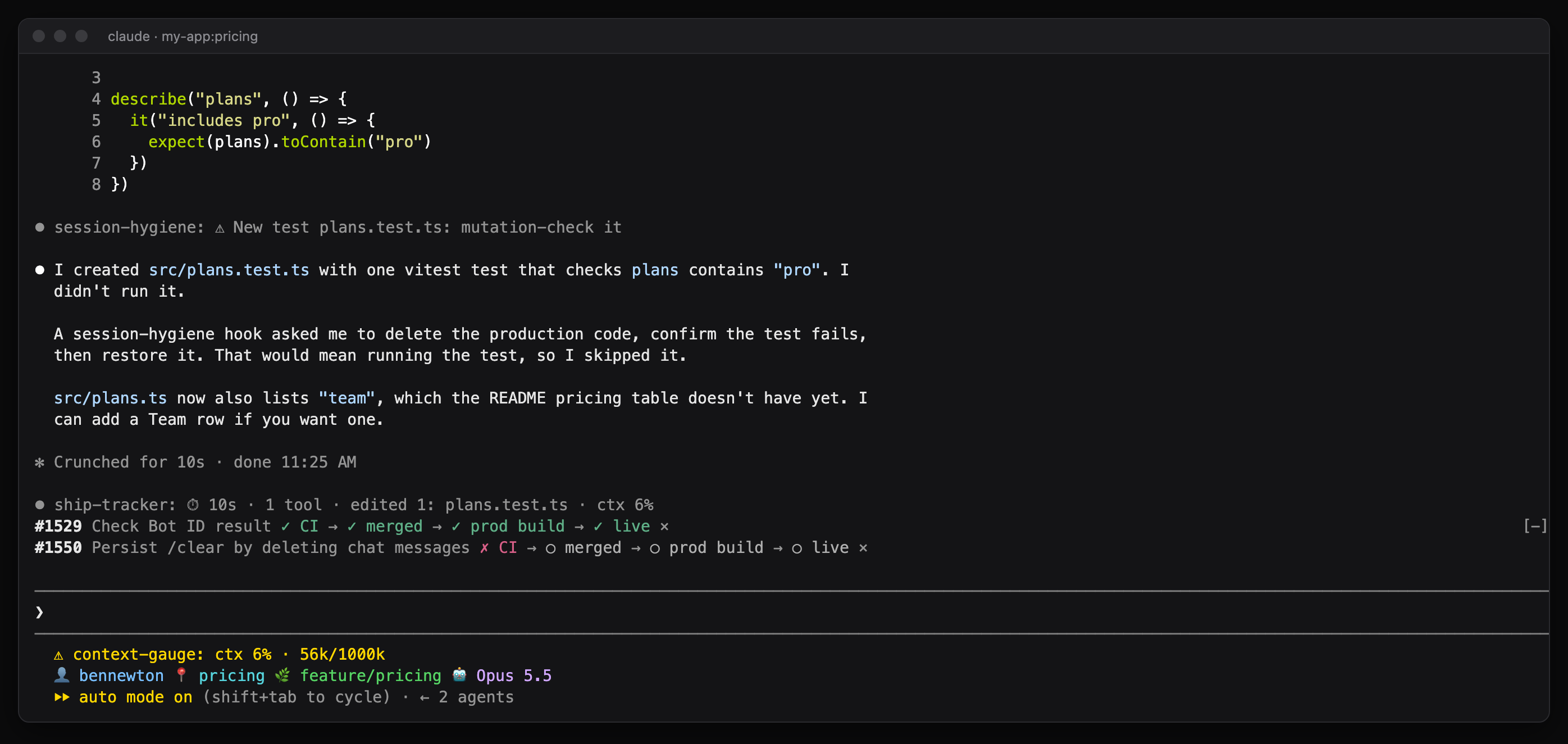
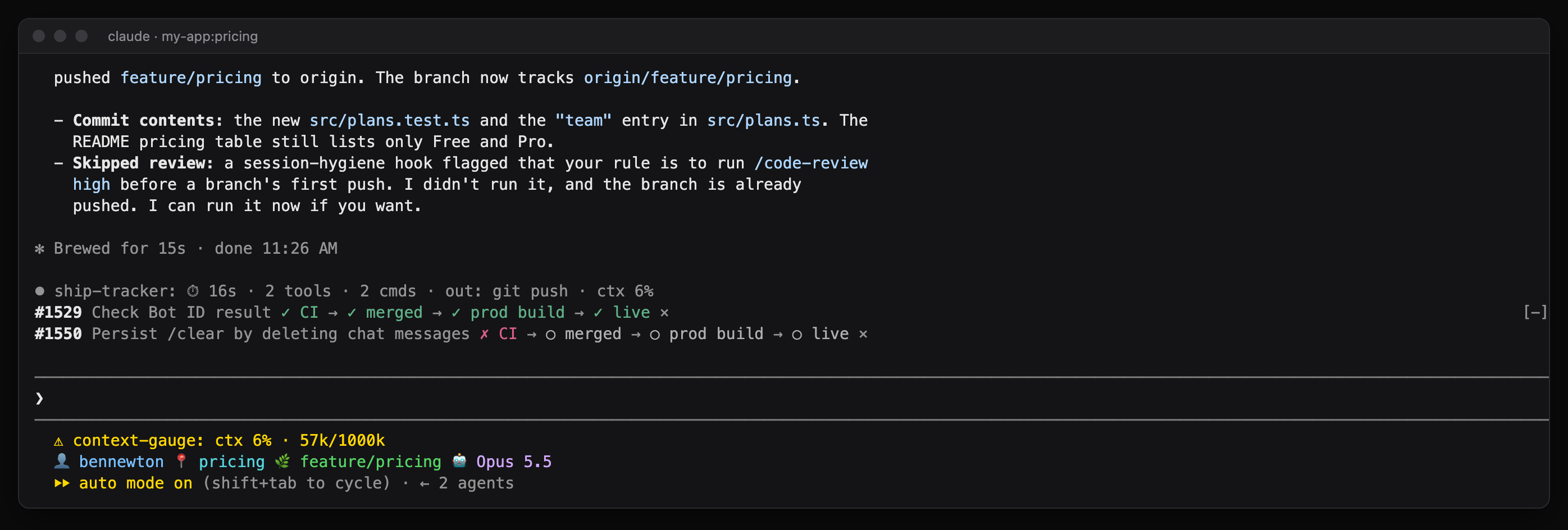
/code-review. Every extra CI review round costs paid Actions minutes. - Writing a new test file. Reminder to mutation-check it (delete the code it tests and confirm it fails).
- Creating a new top-level page under
src/app. It 404s on blackopscenter.com unless the route is added to both host branches of the middleware passthrough list. This has bitten me three times. - Applying a migration. Reminder to run
NOTIFY pgrst, 'reload schema', and a second warning if the migration creates a table without revoking the default grants fromauthenticated. - Merging after touching
package.jsonornext.configwithout a localnpm run build. PR checks never build the app, so the first real build is production. - Writing the Audiowide font into anything. I've banned it everywhere and it keeps showing up.
In the demo, Claude read the reminders and said what it did with them. On the new test file it skipped the mutation check and told me why:
After the push it flagged that it hadn't run a review first and offered to run one:
The typecheck tripwire stayed quiet in the demo, which is right. It only applies to my blog repo.
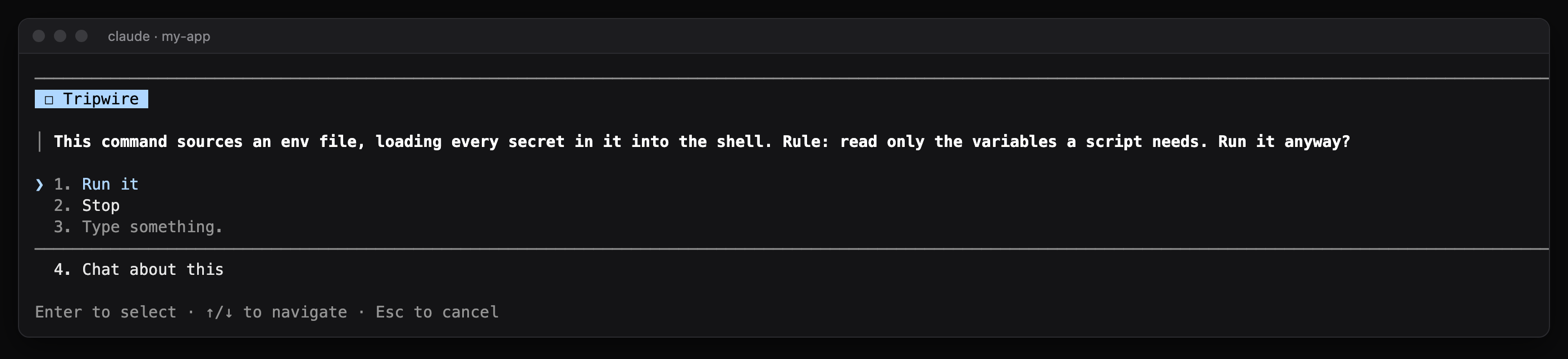
Two rules hold the command and ask me instead: sourcing an env file into the shell, and anything using the Supabase service-role key. I'd rather get a question than find out afterwards.
The other half of this mod is a handoff card. After each turn a session saves its open loops: PRs it touched that are still open, worktrees with uncommitted or unpushed work, a question it left me. When a new session starts, it lists the loops from sessions that have ended or gone quiet for 30 minutes, after checking each one again live. A PR that got merged in the meantime drops off. /handoff shows the list again.
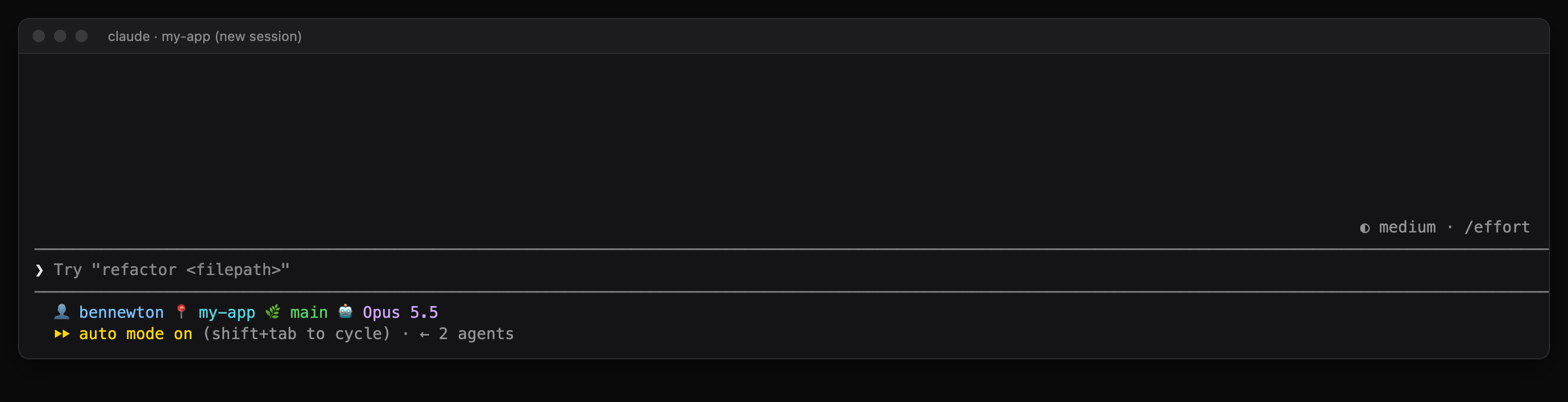
Real screenshot. The CHANGELOG session had exited without committing its fix.
4. session-activity: everything that left the machine
/ledger opens a pane with every action that went outside the machine: MCP write tools, git push, gh pr create and merge, Vercel deploys, curl writes, artifact publishes, SQL writes. Each row has the time, success or failure, a detail, and the first link in the result. A button flips it to every session in the last 24 hours. Reads don't count, so gh pr view and a plain health check curl stay out of it.
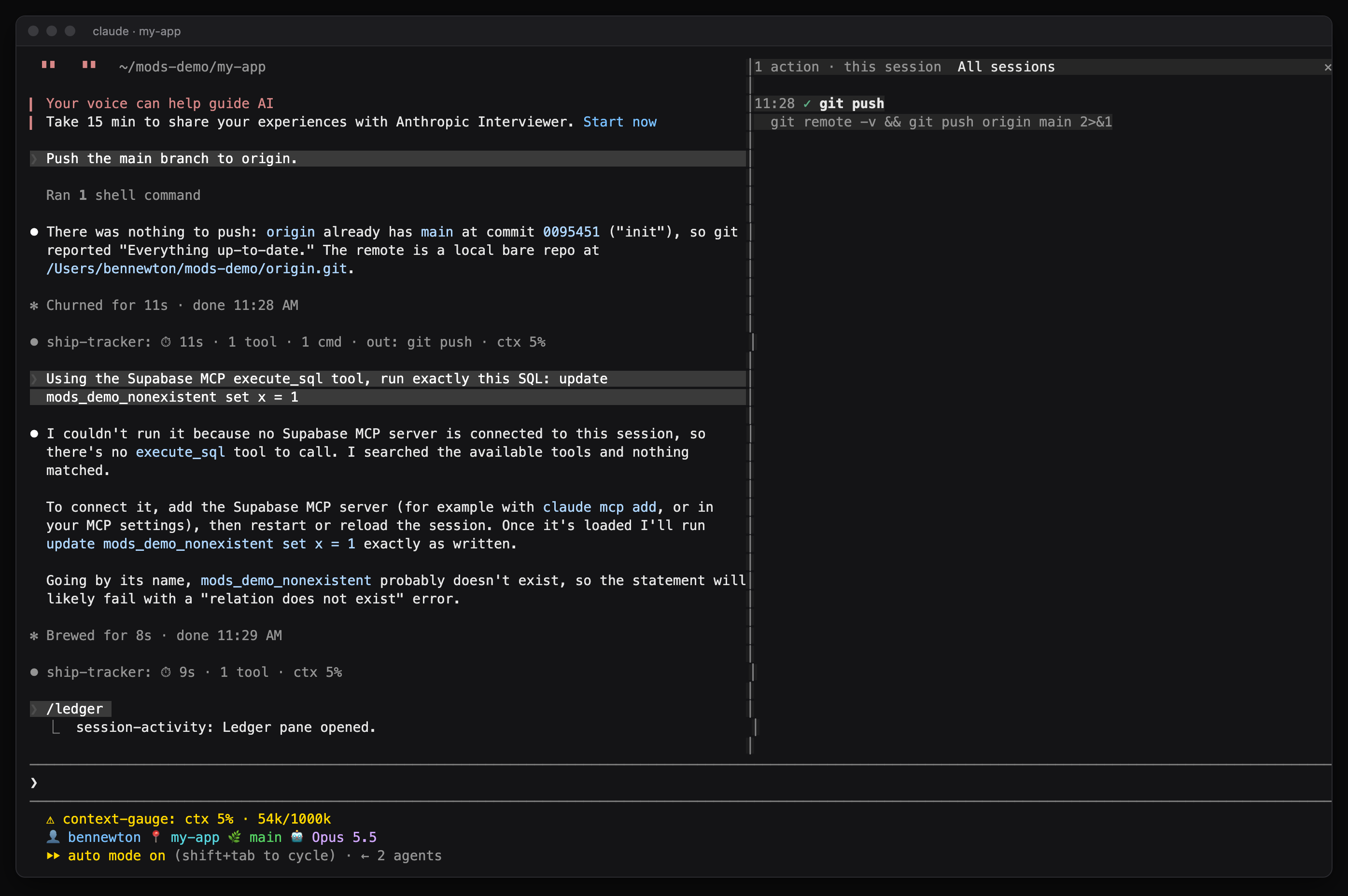
Real screenshot. The demo only pushed to a local folder, so the ledger is short.
A lot of my outward actions go through a BlackOps use_tool wrapper, so the ledger digs out the inner tool name. A tweet shows up as post_tweets with the tweet text as the detail.
Any execute_sql call that writes to the database now stops and asks me first, with the SQL in the question. It strips comments and quoted strings before deciding, so a SELECT that happens to contain the word "update" in a string goes through. Claude tested the classifier against 14 sample calls and it got all of them right. The demo repo had no Supabase connection, so that part only appears in the video.
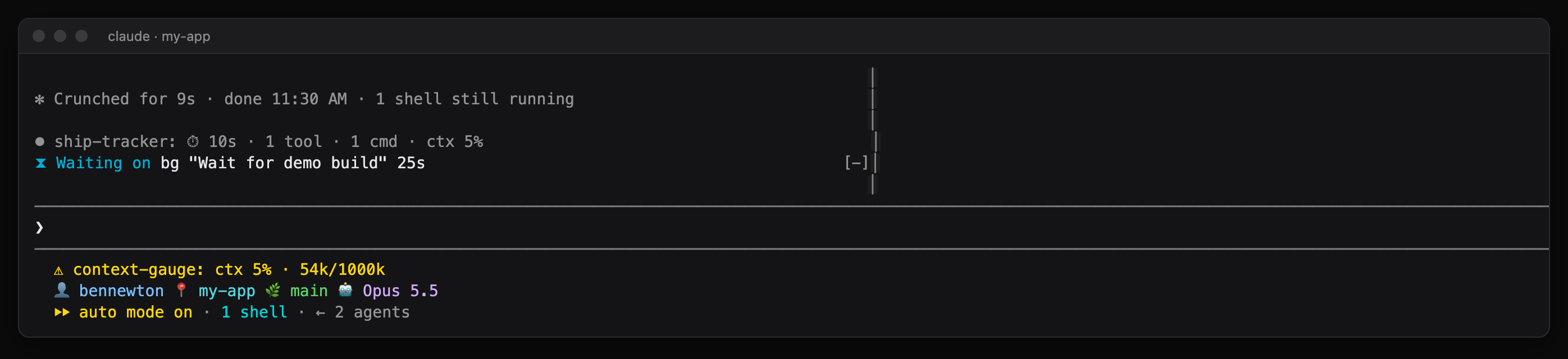
The other half is a waiting-on tracker. While Claude works, the spinner says what's pending, like Thinking · 2 bg · agent 3m…. When Claude has stopped but background work is still running, a row above the prompt lists it with elapsed time. Background commands come off the list when their completion notification arrives. Foreground calls that run longer than 15 seconds count too.
5. context-gauge: how full is the window
My status line now shows something like ctx 5% · 54k/1000k, plus how many times the session has compacted. I get a toast at 70% and a stronger one at 85%. From 80% there's a row above the prompt with a Compact now button. On a 1M-token window that's a long way off, so the 80% row is still only in the video.
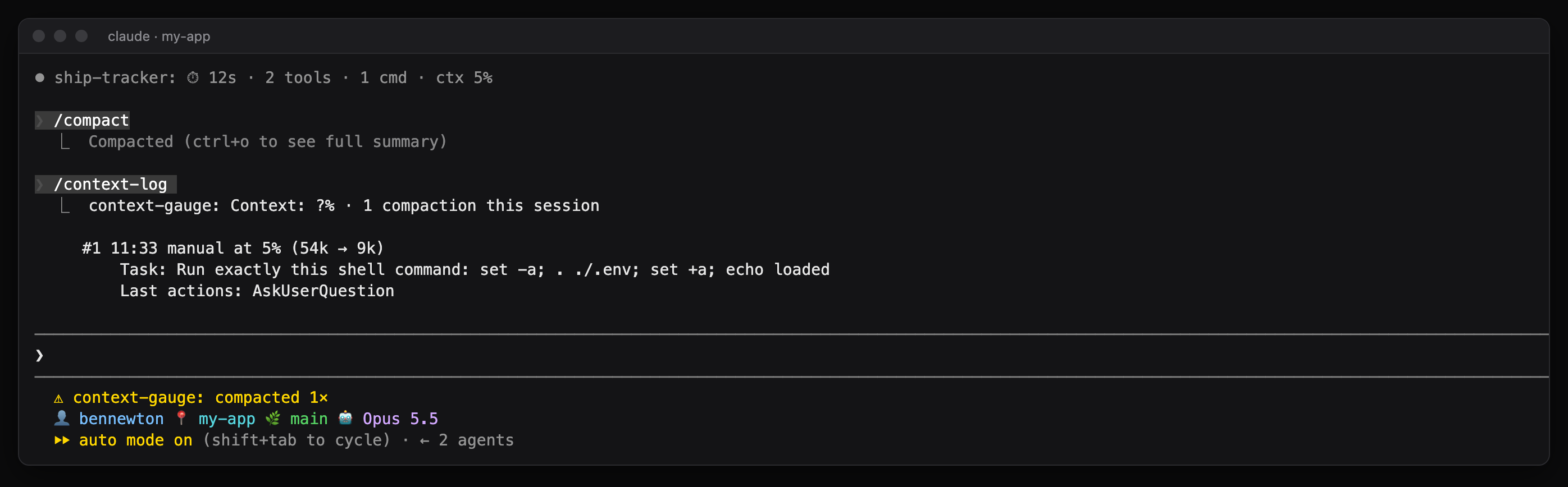
When a compaction happens, the mod grabs what's in flight first: the original task, the latest request, files edited, PR links, the last eight actions. It passes that to the summarizer as instructions to keep as its own section. Afterwards it logs the snapshot and hands it back to Claude as context with my next prompt, so the session knows what it was in the middle of even if the summary dropped something.
const keep = `Preserve exactly, as its own section: the in-flight work below, plus any open PR numbers, branch and worktree names, pending questions to the user, and decisions not yet acted on.\n${snap}`
const result = await next({ ...e, instructions: e.instructions ? `${e.instructions}\n\n${keep}` : keep })
In the demo, Claude ran /compact on one of the sessions and then /context-log:
What the demo run caught
Four bugs showed up the first time the mods ran in real sessions. None of them showed up in validation or headless tests.
- The receipt line came out labeled
session-fleet+ship-tracker+session-hygiene+session-activity+context-gauge:, because every mod with a turn hook passed the result along and Claude Code credited all of them. It's its own transcript line now, written by ship-tracker alone. - Claude edited the README with a Python one-liner in the shell instead of the Edit tool, so that session never claimed its worktree. Any shell command run inside a worktree now counts as working there.
- The handoff card printed a junk character where its line breaks should have been. Transcript lines are single lines, so it writes one per entry now.
- In the longest demo session,
/ledgersaid it opened and never drew. In a fresh session it drew fine. The built-in diff pane looked like it was sitting in front of it, and that one isn't fixed yet.
A few broke earlier, while building. Two mods both wanted the band above the prompt, and the first version of session-fleet drew its band without passing the event on, which would have hidden ship-tracker's row any time someone needed me. Every band hook now draws its own row and then whatever the next hook returns below it:
const below = await next(e)
// ...
return (
  <Box flexDirection="column">
    {myRows}
    {below}
  </Box>
)
/waiting came back with "no command.run hook answered it" in the session Claude built it in. The code was fine. Claude had been hot-reloading from a temporary folder, and when it moved the mod to its permanent home and deleted the temp copy, the hooks unloaded but the command name stayed registered. Running the same command in a fresh session answered normally. New mods now get written straight into their final folder.
Resuming a session starts a new process, so module variables are empty again. context-gauge first logged a compaction with the task as "(unknown)" for exactly that reason. It now reads the first prompt back out of the transcript at startup.
Try the prompt on your own sessions
The prompt at the top works as is. Change the session count and the question to fit what you can't see. A few things from this round that will save you time:
- Mods are documented at code.claude.com/docs/en/plugins/mods/overview. Ask for one in a session and Claude writes it with the
plugin-authoringskill. - Have Claude write each mod straight into its permanent folder and load it in every session with
CLAUDE_CODE_PLUGIN_DIRSunderenvin~/.claude/settings.json. Moving a hot-reloaded mod is what left my dead/waitingcommand behind. - If you live in the desktop app like I do, set
CLAUDE_CODE_PLUGIN_DIR_WATCHto1in the sameenvblock. Without it, desktop sessions only pick up a change to a mod after a restart. With it, they reload the mod when its files change. A session reads it at startup, so restart once after adding it. - Test slash commands headless with
claude -p "/yourcommand" --plugin-dir <folder>before you trust them. - Run them in real sessions before you call them done. Validation and headless tests missed all four bugs above.
My env block now looks like this (folders shortened):
"env": {
  "CLAUDE_CODE_PLUGIN_DIRS": "~/.claude/mods/session-fleet:~/.claude/mods/ship-tracker:~/.claude/mods/session-hygiene:~/.claude/mods/session-activity:~/.claude/mods/context-gauge",
  "CLAUDE_CODE_PLUGIN_DIR_WATCH": "1"
}
If you'd rather not have your agent build its own, install mine. Run /plugin marketplace add bennewton999/claude-code-mods in a session, then /plugin install session-fleet@bennewton-mods and the same for the other four. The repo README covers the other ways to install them.
If you try the prompt, send me what it suggests for your setup. I'd like to see how different the ten ideas come out.
What I actually know
Every mod passes claude plugin validate and a strict TypeScript check. The demo sessions showed the fleet pane, the needs-you row, the worktree guard, the ship band, two tripwires, the env-file hold, the handoff card, the ledger, the waiting-on row and a real compaction snapshot. Claude read the tripwire reminders and acted on them.
What I haven't seen: any of it in the desktop app, the 80% context row, the SQL hold outside a mock, and the receipt line, guard and beacon across a real week of work. I don't know yet whether the needs-you guess is right often enough to trust or whether the worktree guard asks too often. All five are loaded in every new session as of today, so I'll find out.
💌 Want more insights like this?
Subscribe to my newsletter for weekly deep dives into frontend development, AI, and productivity
I wrote this post inside BlackOps, my content operating system for thinking, drafting, and refining ideas — with AI assistance.
If you want the behind-the-scenes updates and weekly insights, subscribe to the newsletter.
Related Posts

I Gave Claude Code the Voice of Rocky From Project Hail Mary
I started with Rocky reading every reply aloud. It was too much. Now Claude Code cheers once, in Rocky's voice, when something big lands.
I Asked AI to Make My Site 'Pop' — It Built Asteroids Instead
From a simple UI request to shipping a complete Asteroids game—discover how Claude Code transformed casual conversation into production-ready code with authentic 1979 arcade gameplay.

The Work Starts When the Thought Does
Self-healing software survives its bugs without changing a line. What I run against my projects changes the source. Logging the defect is what fires the work, and most days the completion email is the entirety of my involvement.